Container
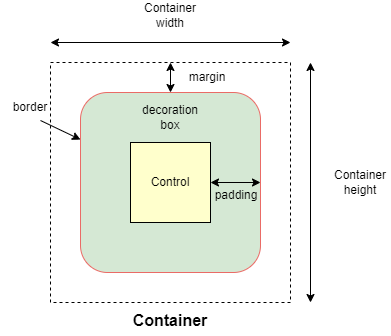
Allows to decorate a control with background color and border and position it with padding, margin and alignment.
Inherits: LayoutControl, AdaptiveControl
Properties
-
alignment(Alignment | None) –Defines the alignment of the
contentinside this container. -
animate(AnimationValue | None) –Enables container "implicit" animation that gradually changes its values over a period of time.
-
bgcolor(ColorValue | None) –Defines the background color of this container.
-
blend_mode(BlendMode | None) –The blend mode applied to the
colororgradientbackground of the container. -
blur(BlurValue | None) –Defines how Gaussian blur effect should be applied under this container.
-
border(Border | None) –A border to draw above the background color.
-
border_radius(BorderRadiusValue | None) –The border radius of this container.
-
clip_behavior(ClipBehavior | None) –Defines how the
contentof this container is clipped. -
color_filter(ColorFilter | None) –Applies a color filter to this container.
-
content(Control | None) –The content of this container.
-
dark_theme(Theme | None) –Allows setting a nested theme to be used when in dark theme mode for all controls inside the container and down its tree.
-
foreground_decoration(BoxDecoration | None) –The foreground decoration of this container.
-
gradient(Gradient | None) –Defines the gradient background of this container.
-
ignore_interactions(bool) –Whether to ignore all interactions with this container and its descendants.
-
image(DecorationImage | None) –An image to paint above the
bgcolororgradient. Ifshape=BoxShape.CIRCLEthen this image is clipped to the circle's boundary; ifborder_radiusis notNonethen the image is clipped to the given radii. -
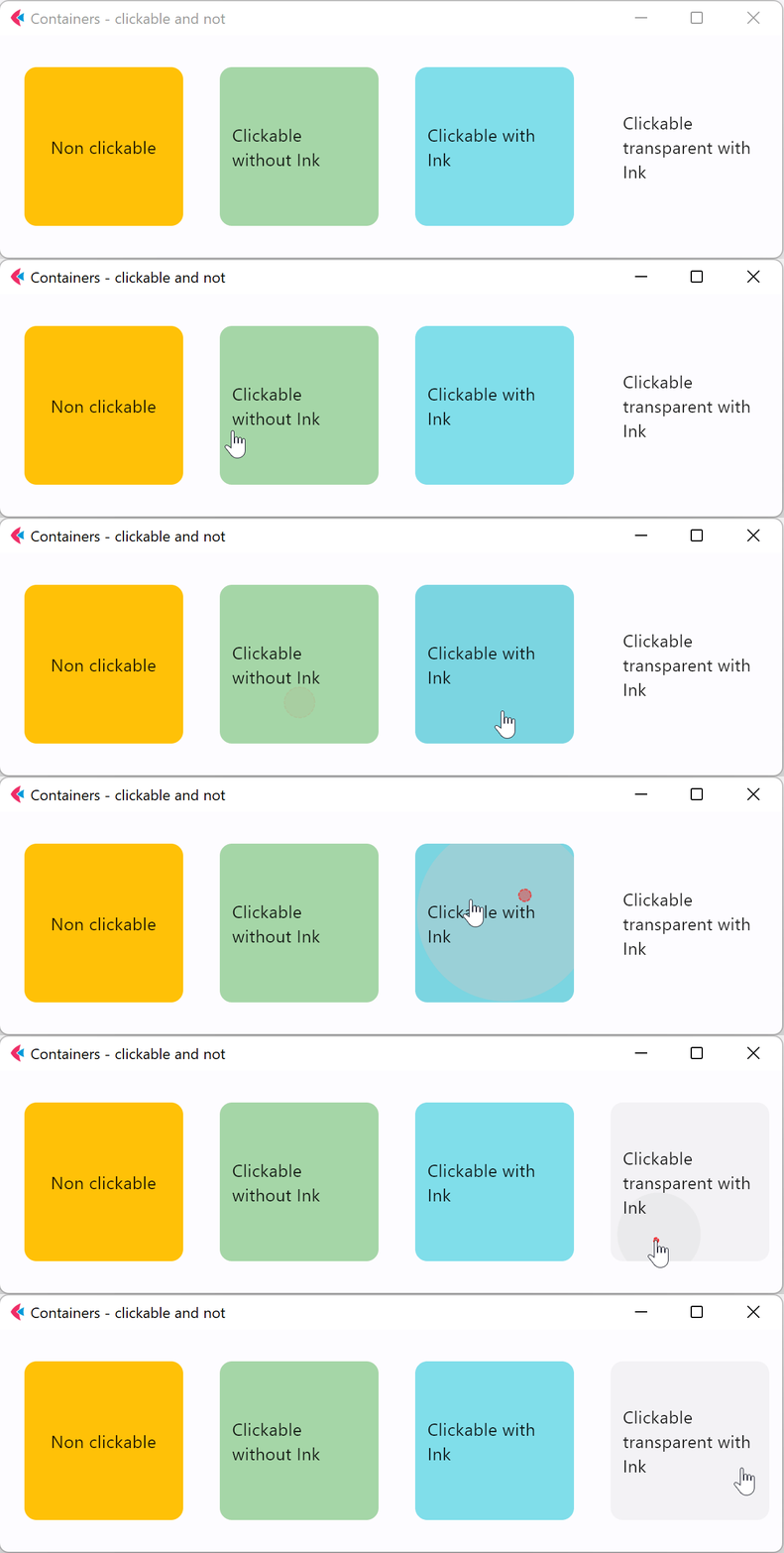
ink(bool) –Trueto produce ink ripples effect when user clicks this container. -
ink_color(ColorValue | None) –The splash color of the ink response.
-
padding(PaddingValue | None) –Empty space to inscribe inside a container decoration (background, border). The child control is placed inside this padding.
-
shadow(BoxShadowValue | None) –The shadow(s) below this container.
-
shape(BoxShape) –Sets the shape of this container.
-
theme(Theme | None) –Allows setting a nested theme for all controls inside this container and down its tree.
-
theme_mode(ThemeMode | None) –"Resets" parent theme and creates a new, unique scheme for all controls inside the container. Otherwise the styles defined in container's
themeproperty override corresponding styles from the parent, inherited theme. -
url(str | Url | None) –The URL to open when this container is clicked.
Events
-
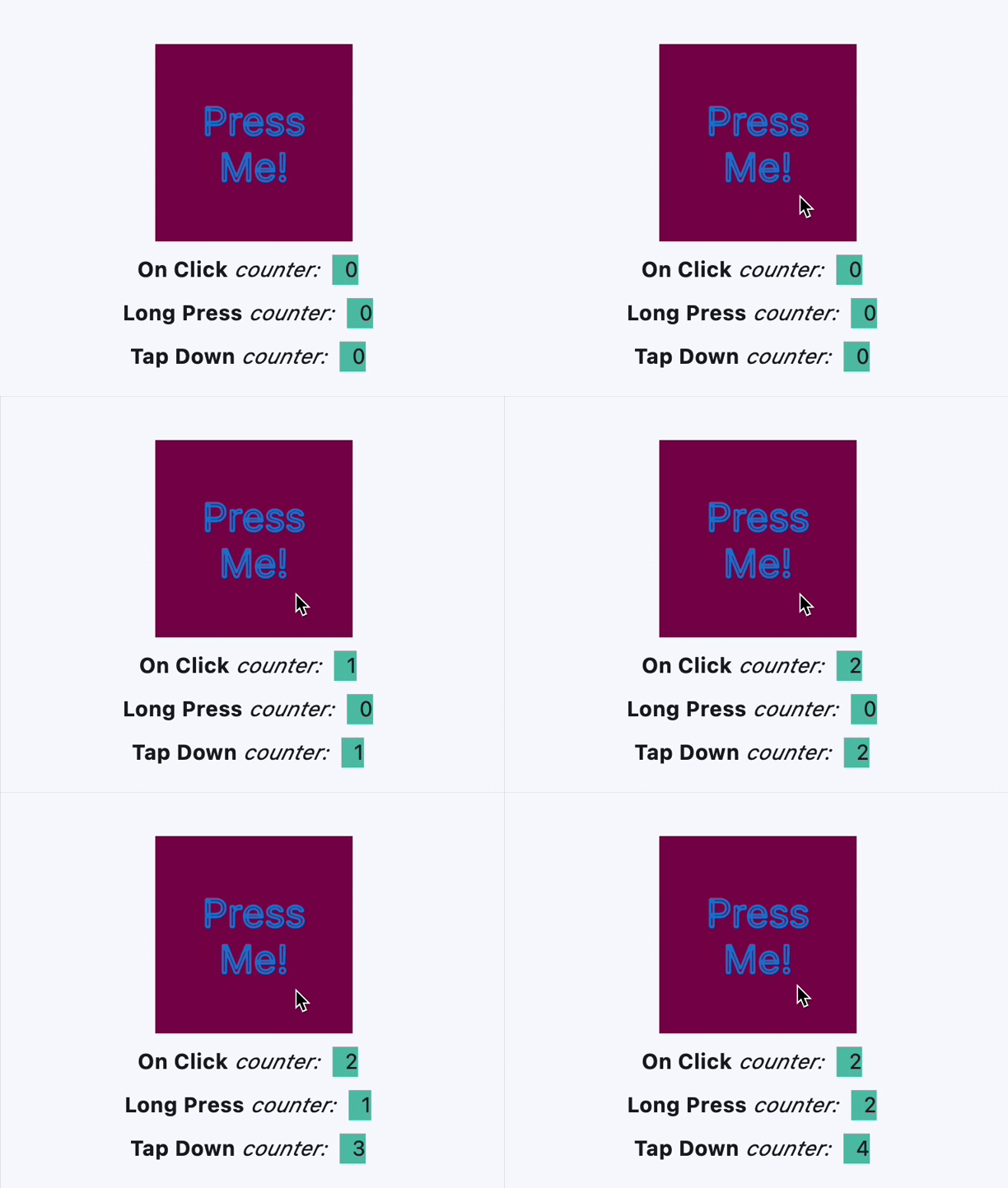
on_click(ControlEventHandler[Container] | None) –Called when a user clicks the container.
-
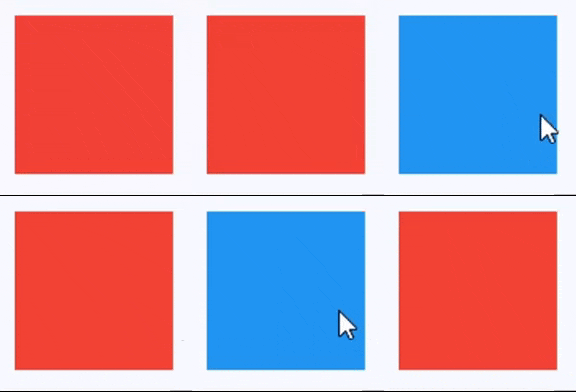
on_hover(ControlEventHandler[Container] | None) –Called when a mouse pointer enters or exists the container area.
-
on_long_press(ControlEventHandler[Container] | None) –Called when this container is long-pressed.
-
on_tap_down(EventHandler[TapEvent[Container]] | None) –Called when a user clicks the container with or without a long press.
Examples#
Clickable container#
import flet as ft


def main(page: ft.Page):
    page.title = "Container Example"
    page.theme_mode = ft.ThemeMode.LIGHT
    page.vertical_alignment = ft.MainAxisAlignment.CENTER
    page.horizontal_alignment = ft.CrossAxisAlignment.CENTER

    page.add(
        ft.Row(
            alignment=ft.MainAxisAlignment.CENTER,
            controls=[
                ft.Container(
                    content=ft.Text("Non clickable"),
                    margin=10,
                    padding=10,
                    alignment=ft.Alignment.CENTER,
                    bgcolor=ft.Colors.AMBER,
                    width=150,
                    height=150,
                    border_radius=10,
                ),
                ft.Container(
                    content=ft.Text("Clickable without Ink"),
                    margin=10,
                    padding=10,
                    alignment=ft.Alignment.CENTER,
                    bgcolor=ft.Colors.GREEN_200,
                    width=150,
                    height=150,
                    border_radius=10,
                    on_click=lambda e: print("Clickable without Ink clicked!"),
                ),
                ft.Container(
                    content=ft.Text("Clickable with Ink"),
                    margin=10,
                    padding=10,
                    alignment=ft.Alignment.CENTER,
                    bgcolor=ft.Colors.CYAN_200,
                    width=150,
                    height=150,
                    border_radius=10,
                    ink=True,
                    on_click=lambda e: print("Clickable with Ink clicked!"),
                ),
                ft.Container(
                    content=ft.Text("Clickable transparent with Ink"),
                    margin=10,
                    padding=10,
                    alignment=ft.Alignment.CENTER,
                    width=150,
                    height=150,
                    border_radius=10,
                    ink=True,
                    on_click=lambda e: print("Clickable transparent with Ink clicked!"),
                ),
            ],
        ),
    )


ft.run(main)
Handling clicks#
import flet as ft


def main(page: ft.Page):
    page.theme_mode = ft.ThemeMode.LIGHT
    page.vertical_alignment = ft.MainAxisAlignment.CENTER
    page.horizontal_alignment = ft.CrossAxisAlignment.CENTER
    lp_counter = 0
    cl_counter = 0
    td_counter = 0

    def on_click(e):
        nonlocal cl_counter
        cl_counter += 1
        t1.spans[-1] = ft.TextSpan(
            text=f"  {cl_counter}  ",
            style=ft.TextStyle(size=16, bgcolor=ft.Colors.TEAL_300),
        )
        page.update()

    def on_long_press(e):
        nonlocal lp_counter
        lp_counter += 1
        t3.spans[-1] = ft.TextSpan(
            text=f"  {lp_counter}  ",
            style=ft.TextStyle(size=16, bgcolor=ft.Colors.TEAL_300),
        )
        page.update()

    def on_tap_down(e):
        nonlocal td_counter
        td_counter += 1
        t2.spans[-1] = ft.TextSpan(
            text=f"  {td_counter}  ",
            style=ft.TextStyle(size=16, bgcolor=ft.Colors.TEAL_300),
        )
        page.update()

    c = ft.Container(
        bgcolor=ft.Colors.PINK_900,
        alignment=ft.Alignment.CENTER,
        padding=ft.Padding.all(10),
        height=150,
        width=150,
        on_click=on_click,
        on_long_press=on_long_press,
        on_tap_down=on_tap_down,
        content=ft.Text(
            "Press Me!",
            text_align=ft.TextAlign.CENTER,
            style=ft.TextStyle(
                size=30,
                # weight=ft.FontWeight.BOLD,
                foreground=ft.Paint(
                    color=ft.Colors.BLUE_700,
                    stroke_cap=ft.StrokeCap.BUTT,
                    stroke_width=2,
                    stroke_join=ft.StrokeJoin.BEVEL,
                    style=ft.PaintingStyle.STROKE,
                ),
            ),
            theme_style=ft.TextThemeStyle.DISPLAY_MEDIUM,
        ),
    )
    t1 = ft.Text(
        spans=[
            ft.TextSpan(
                text="On Click", style=ft.TextStyle(size=16, weight=ft.FontWeight.BOLD)
            ),
            ft.TextSpan(text=" counter:  ", style=ft.TextStyle(size=16, italic=True)),
            ft.TextSpan(
                text=f"  {cl_counter}  ",
                style=ft.TextStyle(size=16, bgcolor=ft.Colors.TEAL_300),
            ),
        ]
    )
    t2 = ft.Text(
        spans=[
            ft.TextSpan(
                text="Tap Down", style=ft.TextStyle(size=16, weight=ft.FontWeight.BOLD)
            ),
            ft.TextSpan(text=" counter:  ", style=ft.TextStyle(size=16, italic=True)),
            ft.TextSpan(
                text=f"  {td_counter}  ",
                style=ft.TextStyle(size=16, bgcolor=ft.Colors.TEAL_300),
            ),
        ]
    )
    t3 = ft.Text(
        spans=[
            ft.TextSpan(
                text="Long Press",
                style=ft.TextStyle(size=16, weight=ft.FontWeight.BOLD),
            ),
            ft.TextSpan(text=" counter:  ", style=ft.TextStyle(size=16, italic=True)),
            ft.TextSpan(
                text=f"  {lp_counter}  ",
                style=ft.TextStyle(size=16, bgcolor=ft.Colors.TEAL_300),
            ),
        ]
    )

    page.add(c, t1, t3, t2)


ft.run(main)
Handling hovers#
import flet as ft


def main(page: ft.Page):
    def handle_hover(e: ft.Event[ft.Container]):
        e.control.bgcolor = ft.Colors.BLUE if e.data else ft.Colors.RED
        e.control.update()

    page.add(
        ft.Container(
            width=200,
            height=200,
            bgcolor=ft.Colors.RED,
            ink=False,
            on_hover=handle_hover,
        )
    )


ft.run(main)
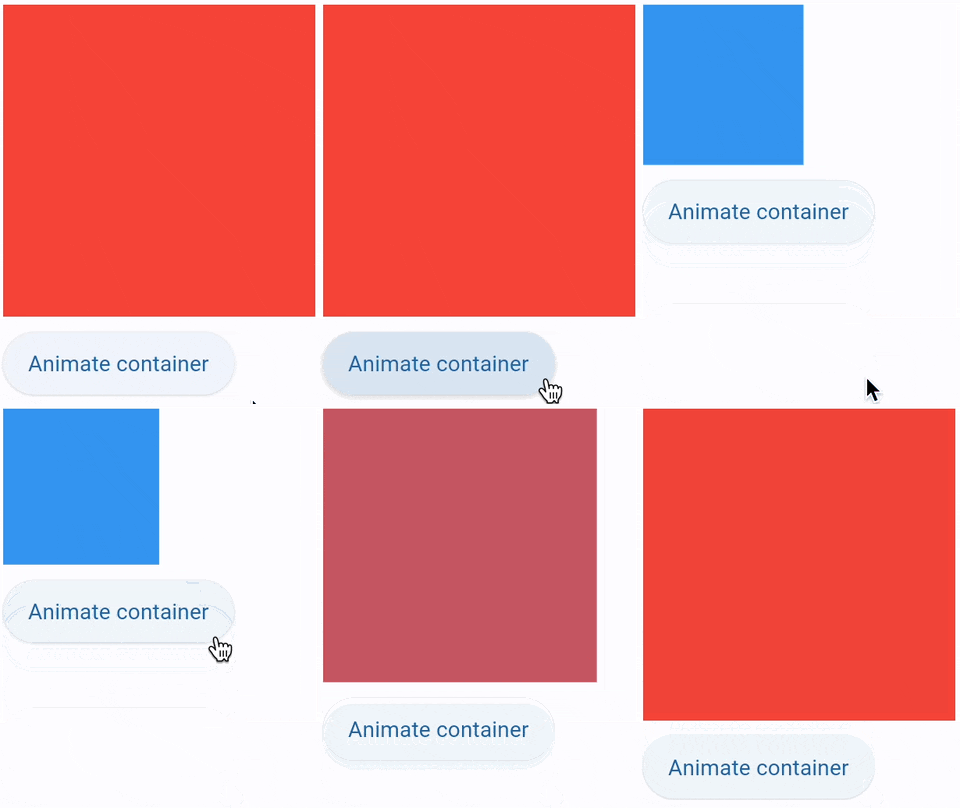
Animate 1#
import flet as ft


def main(page: ft.Page):
    def animate_container(e: ft.Event[ft.Button]):
        container.width = 100 if container.width == 150 else 150
        container.height = 50 if container.height == 150 else 150
        container.bgcolor = (
            ft.Colors.BLUE if container.bgcolor == ft.Colors.RED else ft.Colors.RED
        )
        container.update()

    page.add(
        container := ft.Container(
            width=150,
            height=150,
            bgcolor=ft.Colors.RED,
            animate=ft.Animation(duration=1000, curve=ft.AnimationCurve.BOUNCE_OUT),
        ),
        ft.Button("Animate container", on_click=animate_container),
    )


ft.run(main)
Animate 2#
import flet as ft


def main(page: ft.Page):
    gradient1 = ft.LinearGradient(
        begin=ft.Alignment.TOP_CENTER,
        end=ft.Alignment.BOTTOM_CENTER,
        colors=[ft.Colors.GREEN, ft.Colors.BLUE],
        stops=[0.5, 1.0],
    )
    gradient2 = ft.RadialGradient(
        center=ft.Alignment.TOP_LEFT,
        radius=1.0,
        colors=[ft.Colors.YELLOW, ft.Colors.DEEP_ORANGE_900],
        tile_mode=ft.GradientTileMode.CLAMP,
    )

    message = ft.Text("Animate me!")

    def animate_container(e: ft.Event[ft.Button]):
        message.value = (
            "Animate me back!" if message.value == "Animate me!" else "Animate me!"
        )
        container.width = 150 if container.width == 250 else 250
        container.height = 150 if container.height == 250 else 250
        container.gradient = gradient2 if container.gradient == gradient1 else gradient1
        if container.alignment == ft.Alignment.TOP_LEFT:
            container.alignment = ft.Alignment.BOTTOM_RIGHT
        else:
            container.alignment = ft.Alignment.TOP_LEFT
        container.border_radius = 30 if container.border_radius == 10 else 10
        container.border = (
            ft.Border.all(width=2, color=ft.Colors.BLACK)
            if container.border == ft.Border.all(width=2, color=ft.Colors.BLUE)
            else ft.Border.all(width=2, color=ft.Colors.BLUE)
        )
        container.update()

    page.add(
        container := ft.Container(
            content=message,
            width=250,
            height=250,
            gradient=gradient2,
            alignment=ft.Alignment.TOP_LEFT,
            animate=ft.Animation(duration=1000, curve=ft.AnimationCurve.BOUNCE_OUT),
            border=ft.Border.all(width=2, color=ft.Colors.BLUE),
            border_radius=10,
            padding=10,
        ),
        ft.Button("Animate container", on_click=animate_container),
    )


ft.run(main)
Animate 3#
import flet as ft


def main(page: ft.Page):
    def animate(e: ft.Event[ft.Button]):
        container.width = 100 if container.width == 150 else 150
        container.height = 50 if container.height == 150 else 150
        container.bgcolor = (
            ft.Colors.BLUE if container.bgcolor == ft.Colors.RED else ft.Colors.RED
        )
        container.update()

    page.add(
        container := ft.Container(
            width=150,
            height=150,
            bgcolor=ft.Colors.RED,
            animate=ft.Animation(1000, ft.AnimationCurve.BOUNCE_OUT),
        ),
        ft.Button("Animate container", on_click=animate),
    )


ft.run(main)
Animate 4#
import flet as ft


def main(page: ft.Page):
    def show_menu(e: ft.Event[ft.Button]):
        container.offset = ft.Offset(0, 0)
        container.update()

    def hide_menu(e: ft.Event[ft.IconButton]):
        container.offset = ft.Offset(-2, 0)
        container.update()

    page.overlay.append(
        container := ft.Container(
            left=10,
            top=10,
            width=200,
            height=300,
            bgcolor=ft.Colors.SURFACE_CONTAINER_HIGHEST,
            border_radius=5,
            offset=ft.Offset(-2, 0),
            animate_offset=ft.Animation(300, ft.AnimationCurve.EASE_IN),
            content=ft.Column(
                controls=[
                    ft.Row(
                        alignment=ft.MainAxisAlignment.END,
                        controls=[
                            ft.IconButton(icon=ft.Icons.CLOSE, on_click=hide_menu)
                        ],
                    ),
                    ft.ListTile(
                        title=ft.Text("Menu A"),
                        on_click=lambda _: print("Menu A clicked"),
                    ),
                    ft.ListTile(
                        title=ft.Text("Menu B"),
                        on_click=lambda _: print("Menu B clicked"),
                    ),
                ]
            ),
        )
    )

    page.add(ft.Button("Show menu", on_click=show_menu))


ft.run(main)
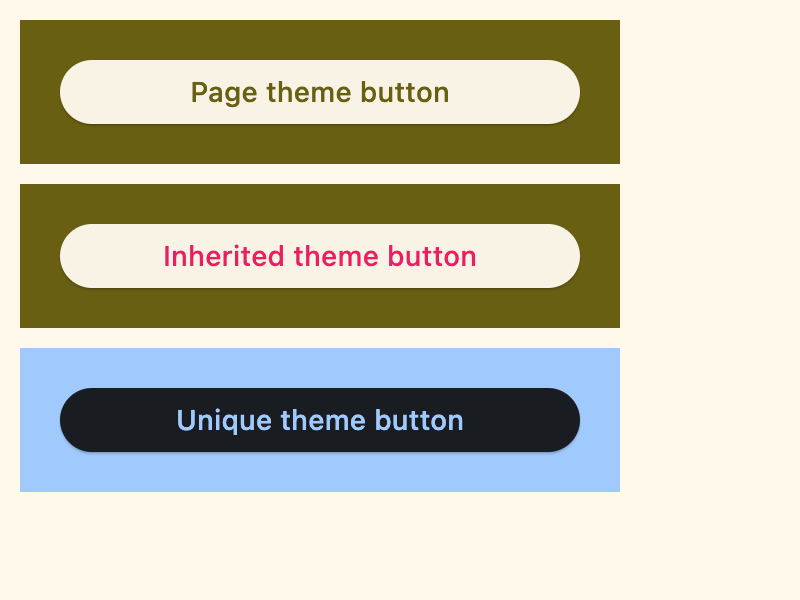
Nested themes 1#
import flet as ft


def main(page: ft.Page):
    # Yellow page theme with SYSTEM (default) mode
    page.theme = ft.Theme(
        color_scheme_seed=ft.Colors.YELLOW,
    )

    page.add(
        # Page theme
        ft.Container(
            content=ft.Button("Page theme button"),
            bgcolor=ft.Colors.SURFACE_TINT,
            padding=20,
            width=300,
        ),
        # Inherited theme with primary color overridden
        ft.Container(
            theme=ft.Theme(color_scheme=ft.ColorScheme(primary=ft.Colors.PINK)),
            content=ft.Button("Inherited theme button"),
            bgcolor=ft.Colors.SURFACE_TINT,
            padding=20,
            width=300,
        ),
        # Unique always DARK theme
        ft.Container(
            theme=ft.Theme(color_scheme_seed=ft.Colors.INDIGO),
            theme_mode=ft.ThemeMode.DARK,
            content=ft.Button("Unique theme button"),
            bgcolor=ft.Colors.SURFACE_TINT,
            padding=20,
            width=300,
        ),
    )


if __name__ == "__main__":
    ft.run(main)
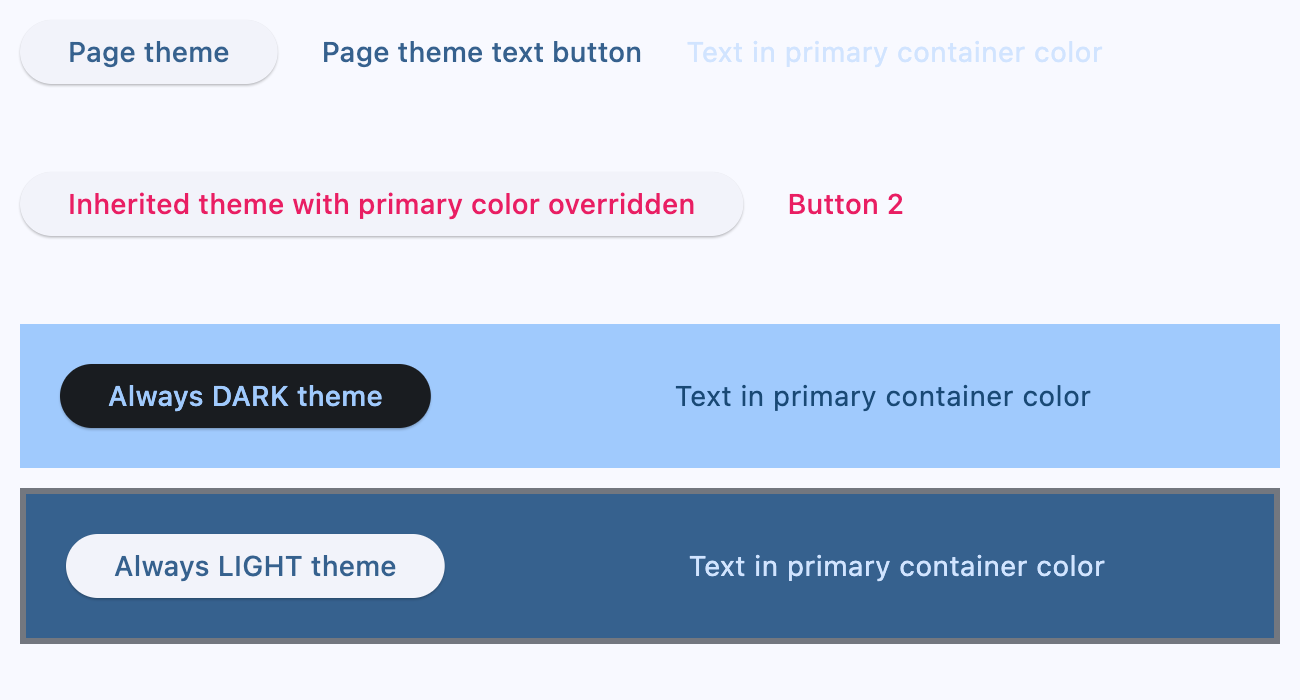
Nested themes 2#
import flet as ft


def main(page: ft.Page):
    # page.theme = ft.Theme(
    #     color_scheme_seed=ft.Colors.YELLOW,
    #     color_scheme=ft.ColorScheme(
    #         primary=ft.Colors.GREEN, primary_container=ft.Colors.GREEN_200
    #     ),
    # )

    page.add(
        ft.Row(
            controls=[
                ft.Button("Page theme"),
                ft.TextButton("Page theme text button"),
                ft.Text(
                    "Text in primary container color",
                    color=ft.Colors.PRIMARY_CONTAINER,
                ),
            ]
        ),
        ft.Container(
            height=100,
            theme=ft.Theme(color_scheme=ft.ColorScheme(primary=ft.Colors.PINK)),
            content=ft.Row(
                controls=[
                    ft.Button("Inherited theme with primary color overridden"),
                    ft.TextButton("Button 2"),
                ]
            ),
        ),
        ft.Container(
            padding=20,
            bgcolor=ft.Colors.SURFACE_TINT,
            theme_mode=ft.ThemeMode.DARK,
            theme=ft.Theme(
                color_scheme_seed=ft.Colors.GREEN,
                color_scheme=ft.ColorScheme(primary_container=ft.Colors.BLUE),
            ),
            content=ft.Row(
                controls=[
                    ft.Button("Always DARK theme"),
                    ft.TextButton("Text button"),
                    ft.Text(
                        "Text in primary container color",
                        color=ft.Colors.PRIMARY_CONTAINER,
                    ),
                ]
            ),
        ),
        ft.Container(
            padding=20,
            bgcolor=ft.Colors.SURFACE_TINT,
            border=ft.Border.all(3, ft.Colors.OUTLINE),
            theme_mode=ft.ThemeMode.LIGHT,
            theme=ft.Theme(),
            content=ft.Row(
                controls=[
                    ft.Button("Always LIGHT theme"),
                    ft.TextButton("Text button"),
                    ft.Text(
                        "Text in primary container color",
                        color=ft.Colors.PRIMARY_CONTAINER,
                    ),
                ]
            ),
        ),
    )


if __name__ == "__main__":
    ft.run(main)
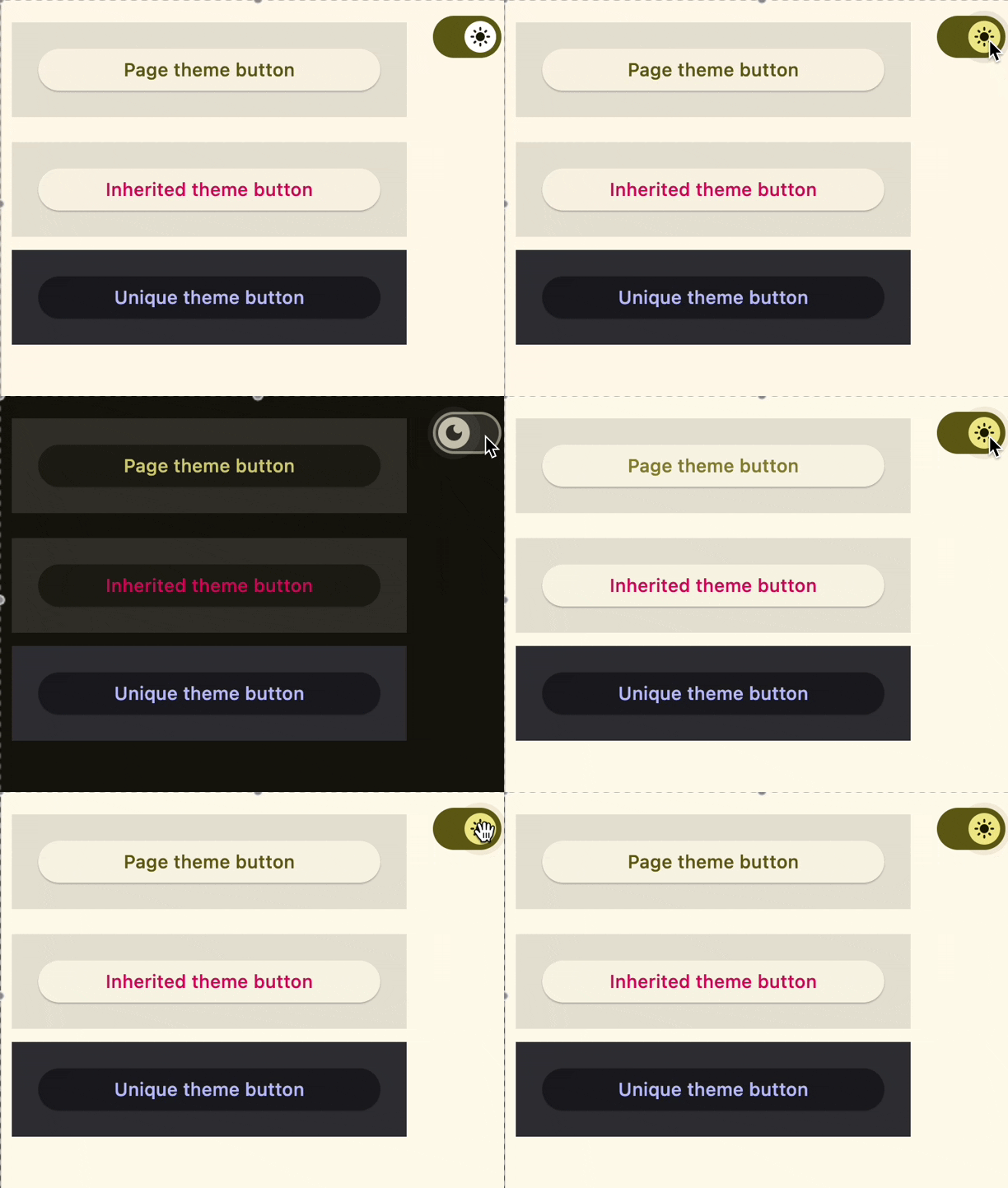
Nested themes 3#
import flet as ft


def main(page: ft.Page):
    page.theme_mode = ft.ThemeMode.DARK

    def handle_switch_change(e: ft.Event[ft.Switch]):
        if page.theme_mode == ft.ThemeMode.DARK:
            page.theme_mode = ft.ThemeMode.LIGHT
            switch.thumb_icon = ft.Icons.LIGHT_MODE
        else:
            switch.thumb_icon = ft.Icons.DARK_MODE
            page.theme_mode = ft.ThemeMode.DARK
        page.update()

    # Yellow page theme with SYSTEM (default) mode
    page.theme = ft.Theme(color_scheme_seed=ft.Colors.YELLOW)

    switch = ft.Switch(thumb_icon=ft.Icons.DARK_MODE, on_change=handle_switch_change)

    page.add(
        # Page theme
        ft.Row(
            alignment=ft.MainAxisAlignment.SPACE_BETWEEN,
            controls=[
                ft.Container(
                    content=ft.Button("Page theme button"),
                    bgcolor=ft.Colors.SURFACE_TINT,
                    padding=20,
                    width=300,
                ),
                ft.Container(
                    content=switch,
                    padding=ft.Padding.only(bottom=50),
                    alignment=ft.Alignment.TOP_RIGHT,
                ),
            ],
        ),
        # Inherited theme with primary color overridden
        ft.Container(
            theme=ft.Theme(color_scheme=ft.ColorScheme(primary=ft.Colors.PINK)),
            content=ft.Button("Inherited theme button"),
            bgcolor=ft.Colors.SURFACE_TINT,
            padding=20,
            width=300,
        ),
        # Unique always DARK theme
        ft.Container(
            theme=ft.Theme(color_scheme_seed=ft.Colors.INDIGO),
            theme_mode=ft.ThemeMode.DARK,
            content=ft.Button("Unique theme button"),
            bgcolor=ft.Colors.SURFACE_TINT,
            padding=20,
            width=300,
        ),
    )


ft.run(main)
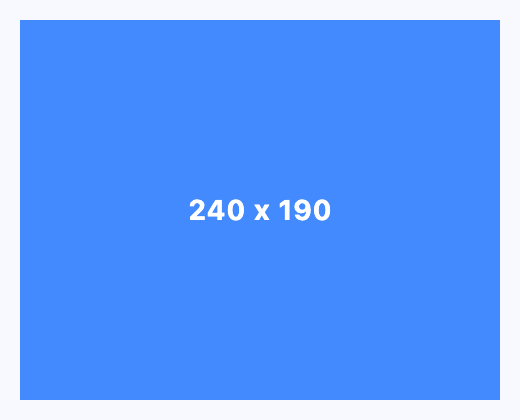
Size aware#
import flet as ft


def main(page: ft.Page):
    def handle_size_change(e: ft.LayoutSizeChangeEvent[ft.Container]):
        e.control.content.value = f"{int(e.width)} x {int(e.height)}"

    page.add(
        ft.Container(
            expand=True,
            alignment=ft.Alignment.CENTER,
            bgcolor=ft.Colors.BLUE_ACCENT,
            content=ft.Text(color=ft.Colors.WHITE, weight=ft.FontWeight.BOLD),
            size_change_interval=100,
            on_size_change=handle_size_change,
        )
    )


if __name__ == "__main__":
    ft.run(main)
Properties#
class-attribute
instance-attribute
#
alignment: Alignment | None = None
Defines the alignment of the content inside this container.
Note
If alignment is non-None, this container may expand to fill the
available space from its parent (before positioning its content
within itself according to the given alignment) instead of shrinking to its
content. If you need this container to keep a fixed size, give it
container an explicit width and/or height values, or constrain it via
its parent.
class-attribute
instance-attribute
#
animate: AnimationValue | None = None
Enables container "implicit" animation that gradually changes its values over a period of time.
class-attribute
instance-attribute
#
bgcolor: ColorValue | None = None
Defines the background color of this container.
class-attribute
instance-attribute
#
blend_mode: BlendMode | None = None
The blend mode applied to the color or gradient background of the container.
Defaults to BlendMode.MODULATE.
class-attribute
instance-attribute
#
blur: BlurValue | None = None
Defines how Gaussian blur effect should be applied under this container.
Example
ft.Stack(
    controls=[
        ft.Container(
            content=ft.Text("Hello"),
            image_src="https://picsum.photos/100/100",
            width=100,
            height=100,
        ),
        ft.Container(
            width=50,
            height=50,
            blur=10,
            bgcolor="#44CCCC00",
        ),
        ft.Container(
            width=50,
            height=50,
            left=10,
            top=60,
            blur=(0, 10),
        ),
        ft.Container(
            top=10,
            left=60,
            blur=ft.Blur(10, 0, ft.BlurTileMode.MIRROR),
            width=50,
            height=50,
            bgcolor="#44CCCCCC",
            border=ft.border.all(2, ft.Colors.BLACK),
        ),
    ]
)
class-attribute
instance-attribute
#
border: Border | None = None
A border to draw above the background color.
class-attribute
instance-attribute
#
border_radius: BorderRadiusValue | None = None
The border radius of this container.
class-attribute
instance-attribute
#
clip_behavior: ClipBehavior | None = None
Defines how the content of this container is clipped.
Defaults to ClipBehavior.ANTI_ALIAS if border_radius is not None;
otherwise ClipBehavior.NONE.
class-attribute
instance-attribute
#
color_filter: ColorFilter | None = None
Applies a color filter to this container.
class-attribute
instance-attribute
#
content: Control | None = None
The content of this container.
class-attribute
instance-attribute
#
dark_theme: Theme | None = None
Allows setting a nested theme to be used when in dark theme mode for all controls inside the container and down its tree.
class-attribute
instance-attribute
#
foreground_decoration: BoxDecoration | None = None
The foreground decoration of this container.
class-attribute
instance-attribute
#
gradient: Gradient | None = None
Defines the gradient background of this container.
class-attribute
instance-attribute
#
ignore_interactions: bool = False
Whether to ignore all interactions with this container and its descendants.
class-attribute
instance-attribute
#
image: DecorationImage | None = None
An image to paint above the bgcolor or gradient. If shape=BoxShape.CIRCLE then this image is clipped to the circle's boundary; if border_radius is not None then the image is clipped to the given radii.
class-attribute
instance-attribute
#
ink: bool = False
True to produce ink ripples effect when user clicks this container.
class-attribute
instance-attribute
#
ink_color: ColorValue | None = None
The splash color of the ink response.
class-attribute
instance-attribute
#
padding: PaddingValue | None = None
Empty space to inscribe inside a container decoration (background, border). The child control is placed inside this padding.
class-attribute
instance-attribute
#
shadow: BoxShadowValue | None = None
The shadow(s) below this container.
class-attribute
instance-attribute
#
Sets the shape of this container.
class-attribute
instance-attribute
#
theme: Theme | None = None
Allows setting a nested theme for all controls inside this container and down its tree.
class-attribute
instance-attribute
#
theme_mode: ThemeMode | None = None
"Resets" parent theme and creates a new, unique scheme for all controls inside the container. Otherwise the styles defined in container's theme property override corresponding styles from the parent, inherited theme.
Defaults to ThemeMode.SYSTEM.
class-attribute
instance-attribute
#
The URL to open when this container is clicked.
Additionally, if an on_click callback is provided,
it is fired after that.
Events#
class-attribute
instance-attribute
#
on_click: ControlEventHandler[Container] | None = None
Called when a user clicks the container.
It will not be called if this container is long pressed.
class-attribute
instance-attribute
#
on_hover: ControlEventHandler[Container] | None = None
Called when a mouse pointer enters or exists the container area.
The data property of the event handler argument is a boolean:
True when the cursor enters and False when it exits this container.
class-attribute
instance-attribute
#
on_long_press: ControlEventHandler[Container] | None = None
Called when this container is long-pressed.
class-attribute
instance-attribute
#
on_tap_down: EventHandler[TapEvent[Container]] | None = None
Called when a user clicks the container with or without a long press.